


Main navigation
| Section | Purpose |
|---|---|
| Profiles | Create, edit, start and organize your browser sessions. |
| Proxies | Save connections, test them and manage provider inventories. |
| Extensions | Install and assign extensions centrally, depending on your plan. |
| Automation | Find the local API and connection details for your scripts. |
| Backups | Create backups and restore full profiles, depending on your plan. |
| Settings | Preferences, security, engine and updates. |
| Account | Login, subscription, quotas, devices and plan purchases. |
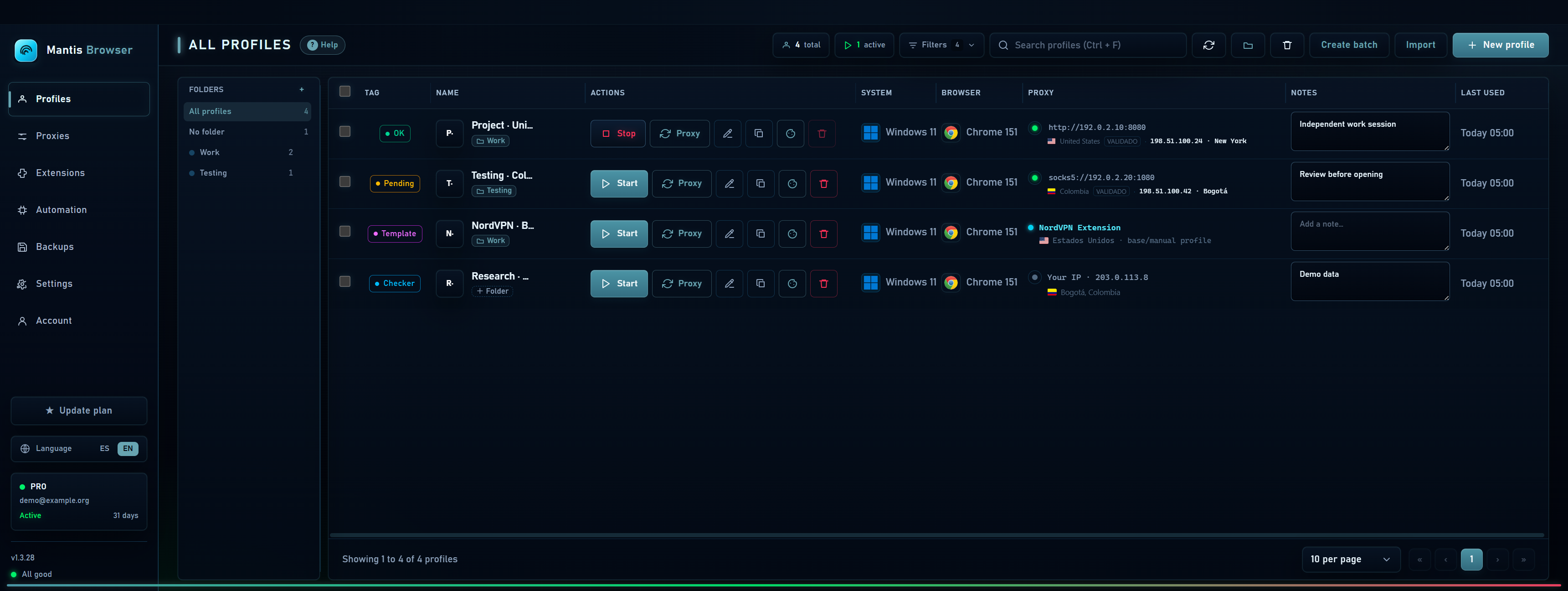
The profile table
Each row represents a profile. Columns contain status, name, actions, system, browser, proxy, notes and last use. Running indicators identify open windows; the status labels you assign help organize your work.
- Hover over action icons to see their purpose: start, stop, edit, duplicate, cookies, history, lock or delete.
- Select row checkboxes to reveal actions for multiple profiles.
- Resize panels and columns from their edges when you need more room.
Useful shortcuts
| Shortcut | Action |
|---|---|
| Ctrl + F | Search profiles. |
| Ctrl + N | Open New profile. |
| F5 | Refresh the view. |
| Shift + click | Select a range of rows. |
| Ctrl + Enter | Save a note while editing it. |
| Esc | Close a dialog or leave search, depending on context. |