


Work folders
- Create a folder from the Profiles side panel; use subfolders to group projects.
- Drag selected rows onto a folder or use Move.
- Select a folder to filter the table. A profile belongs to one folder at a time.
- Drag the folder panel’s right edge to resize it; double-click to reset it.
Folders organize the list inside Mantis; they are not new accounts and do not change the session’s Internet location.
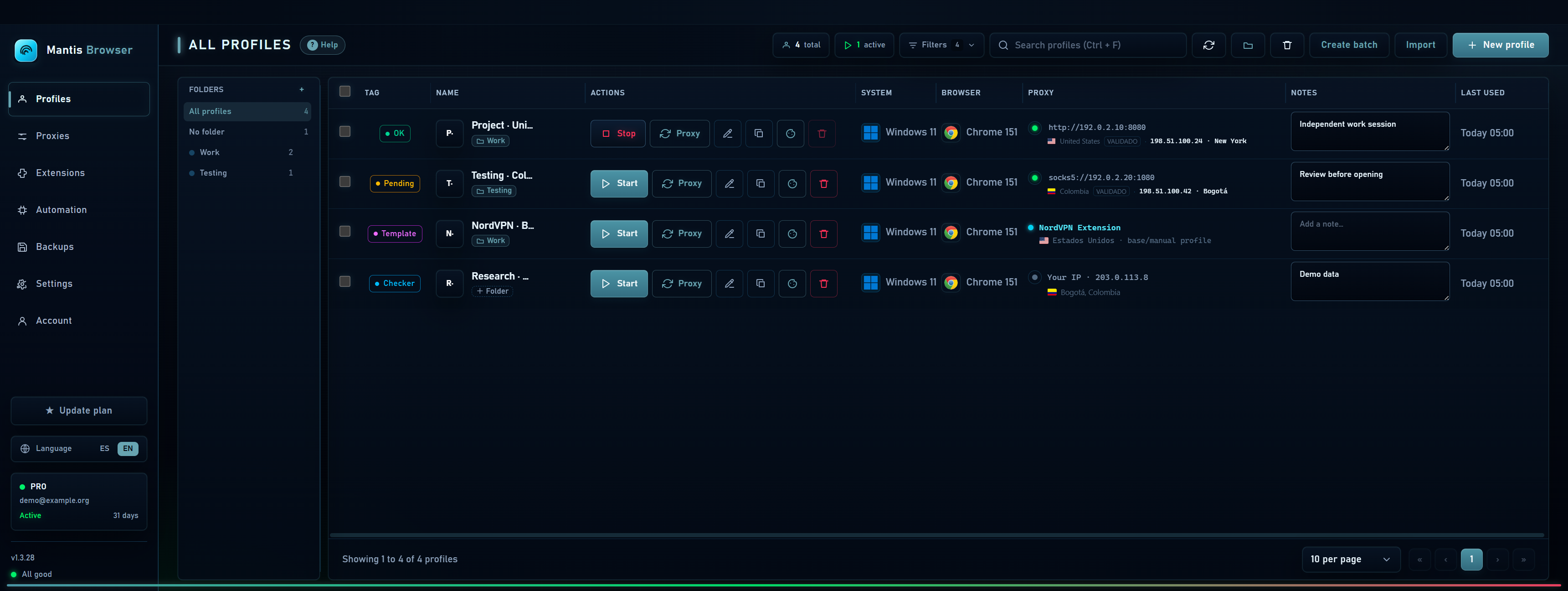
Tags and statuses
Use tags to group by client, country or project without moving a profile to a different folder. Statuses describe your work state, such as pending, active or blocked by a website. They are organizational labels, not automatic checks of external accounts.
Select several rows to assign a tag or move the group. The header checkbox selects rows on the current page, so check your selection before applying changes.
Search, pin and annotate
- Search can find profiles by name, tags, notes or IP. Combine it with the folder filter to narrow results.
- Pin a profile to keep it handy. This does not start its browser or increase its priority within your plan.
- Write short notes about pending work. Save by leaving the field or pressing Ctrl + Enter.
- Do not store passwords or recovery codes in notes: those texts are part of the profile’s local data.