

Buying guideWindows and Mac

7 checks before paying for a multi-profile browser

A guide by Mantis Browser: examples use our own app.

Evaluate capacity, PCs, automation, data and total cost with a checklist you can apply to Mantis or any alternative.

Updated 3 min readLeer en español

Buy for the work you do today#

Start with your projects, not the provider’s biggest table. Five clients do not always mean five profiles: some have multiple brands or accounts, and you may want separate test profiles. Also record how many PCs you will use and which tasks require API access.

Record which features are essential and which would merely be useful. That lets you compare small packages without assuming they include higher-tier features. A headline price may be an annual plan’s monthly equivalent: check the amount charged today.

The checklist#

  1. Profiles: distinguish stored, concurrent, local and cloud profiles. Check how test profiles count.
  2. PCs: check device count and supported systems. A macOS identity inside a profile is not a Mac application.
  3. Features: verify API, bulk creation, backups, CSV and extensions for the exact plan.
  4. Connection: check proxy protocols and whether the service must be purchased separately.
  5. Data: confirm what the product exports and whether it can be restored on another PC.
  6. End of payment: find out which functions and limits change; do not assume sessions remain available.
  7. Total cost: separate software, taxes, proxies, traffic and extra resources.

How this applies to Mantis plans#

PlanProfiles per PCMonthly
Basic154.99 USD
Starter309.00 USD
Pro5019.00 USD
MaxUnlimited39.00 USD

Basic includes organization and proxies, but not API, bulk creation, backups/CSV or centralized extensions. Starter adds those features except API; Pro and Max include API/CDP. Basic allows one PC; Starter, 2; Pro, 3; and Max, 5. The app is available for 64-bit Windows and Apple silicon Macs. Plans do not include proxies (they are sold separately in Mantis Proxies) or cloud phones.

Several PCs do not mean automatic synchronization or independently permissioned users. When a subscription ends, the free allowance applies; if you retain more profiles, check which you can open in the app. Do not delete data assuming a plan change removes it.

A test before paying#

Create a work profile and a test profile. Check launch, active account, proxy when needed and organization. Then read about the backup or export format you would use. If an essential feature is absent from Free, check its documentation and required plan.

Review Mantis pricing with this checklist. Starting small lets you evaluate the workflow before taking on a larger subscription; it does not mean an inexpensive package fits every case.
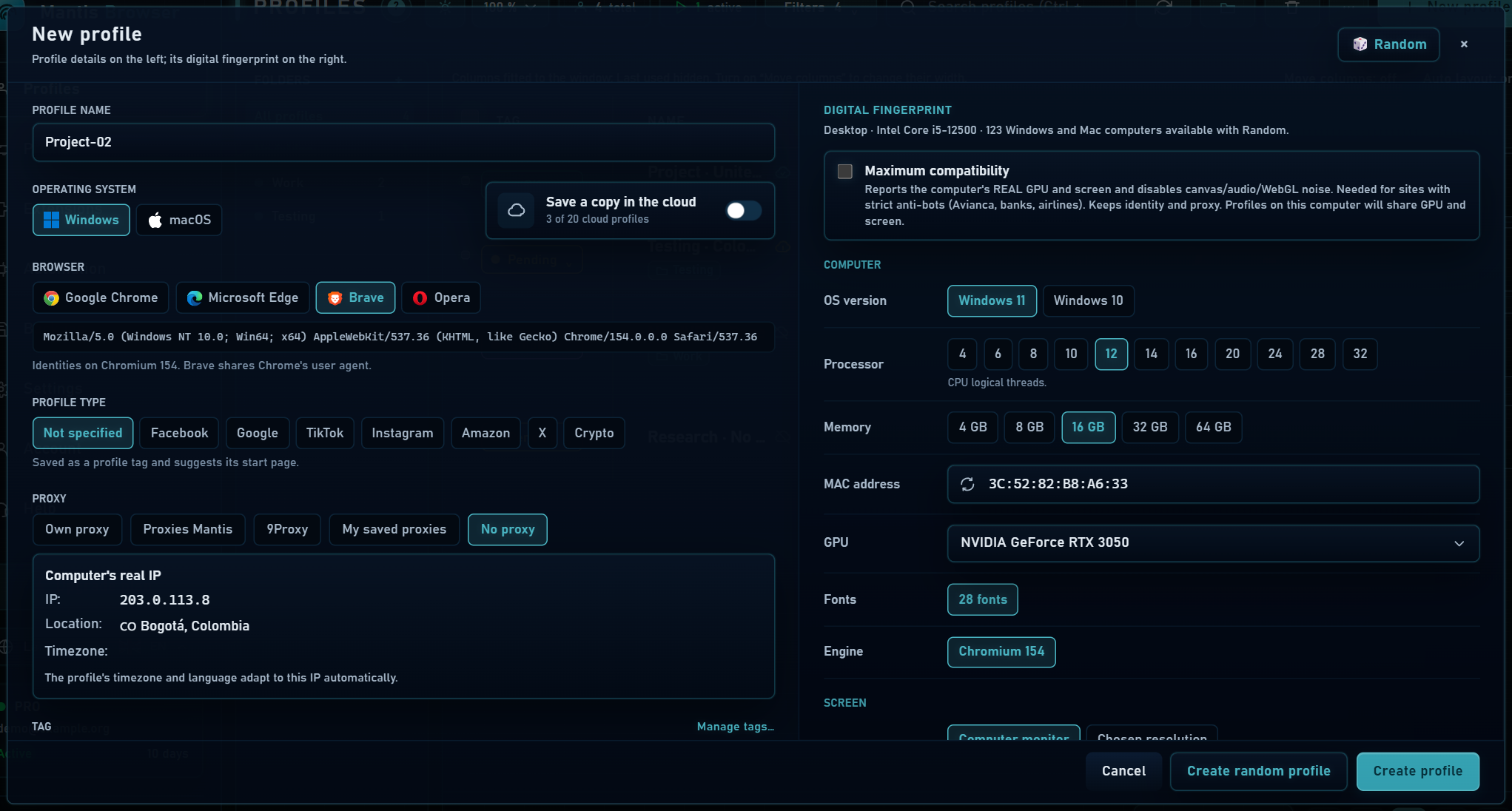
Profile settings with a configurable name and connection.Profile settings with a configurable name and connection.
Real interface · Example data A useful trial includes naming the project, reviewing settings and reopening its session. Endpoints are examples.

Put the guide into practice with Mantis

If you need to organize projects on Windows or Mac, try Mantis with 5 profiles on 1 computer, with no card or expiry. Advanced features such as API/CDP, bulk creation and backups depend on your plan; check the limits before buying.

If you would rather stick with what you already use, keep the organization part: it applies just the same.

Continue in the manual

Account, plans and devicesWhere your data is storedBackups and restorationAutomation with Playwright and Puppeteer

Cookies and storage

Necessary: used when you choose a language, sign in or buy. Disabling them affects those features; you can clear them through your browser.

Optional first-party statistics: daily totals by page and campaign, retained for 180 days. No stored IP addresses or visitor identifiers (if you arrive from an ad, a hashed code of your connection for 7 days to attribute the signup in the app). These first-party statistics are not sent to Google. The campaign is remembered only in this tab if you accept. You can reject or withdraw your choice here; website features remain available.

Google receives technical data (IP address, browser and ad click), verified signups and confirmed purchases (order reference, amount and currency). We send no emails, passwords or browser profile data. Ad personalization requires the additional option below. We use no enhanced conversions. Its tag loads only if you accept this option.

Allows ads on Google, YouTube, Facebook and Instagram based on your website visits and interactions. Includes the Google measurement above and the Meta pixel for visits, downloads, verified signups and confirmed purchases. Meta receives IP address, browser, advertising identifiers and website events; never emails, passwords or browser profile data. You can withdraw permission here.

Only with this option, TikTok receives visits, downloads, verified signups and confirmed purchases through its pixel and Events API. Includes IP address, browser, ad identifiers, order reference, amount and currency; never emails, passwords or browser profile data. This permission is independent of Google and Meta and can be withdrawn here.

Read the full policy